

the return portal
How it works
Droppa integrates seamlessly with your existing systems through three simple steps:
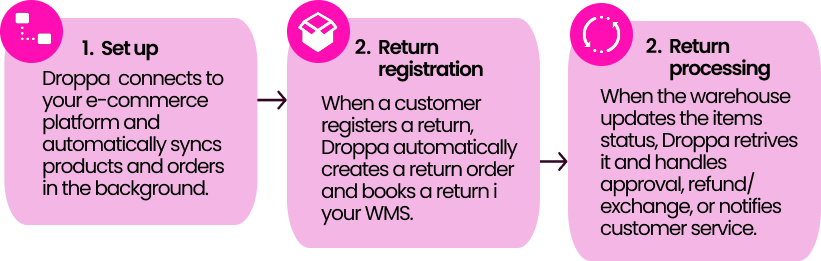
The entire flow is automated, reducing manual work and ensuring customers get quick resolutions while you maintain full visibility and control.
Navigate the return portal
The return portal is intuitive and mobile-optimized, guiding customers through each step. They log in, select an order, choose refund, exchange, or claim, pick a shipping option, and receive a QR code for drop-off creating a smooth experience on any device.

Customer login
Customers can sign in with Google (or another social login) for quick access.
All orders linked to their email automatically shown in a simple list. Prefer not to log in? Just enter your email and order number from the confirmation email.
How it works:
Social login searches your order history and matches the provided email address to the corresponding orders, creating a smoother and more intuitive experience from start to finish.
Why this matters
The most common frustration customers face during returns is hunting through their inbox for an order number. By offering two login methods, we eliminate this friction and accommodate different customer preferences:
Social login allows customers to:
- Sign in with their Google account (no registration required)
- View all their orders in one place automatically
- Skip the step of finding their order number entirely
Email and order based login provides:
- A quick, familiar option for customers who have their order details handy
- No account creation needed — just the information from their order confirmation
The return process
Our return process is simple and guides customers step by step. They can choose one or multiple orders, select a return option, and get a clear shipping plan.

Selecting items
Once logged in, customers see all their orders with product images and details like name, size, and color. They simply select the items they want to return and continue.

Return options
We offer three clear options: Exchange, Return, or Claim for damaged items. They’re shown upfront, making it easy to choose what fits best.
During returns, customers pick a reason like wrong size, not what they expected, or just because. You can customize the options to fit your business and collect useful return data along the way.
Exchange
Give customers a seamless way to exchange products for different sizes, colors, or alternative items with just a few clicks. This option helps you retain revenue that would otherwise be lost to refunds.
Instant exchange
With Instant Exchange, the replacement ships as soon as the return is dropped off and by doing so cutting the wait to just a few days and making exchanges quick, smooth, and satisfying.
Why it works:
By making exchanges easy, you encourage customers to find the right product instead of walking away. Our data shows that offering free exchanges increases revenue retention by 7%.
Customizable product selection:
You have full control over which products appear during the exchange process:
- Different sizes, colors, or fits of the original item
- Alternative products within the same price range
- Any combination that works for your business

We recommend keeping the selection limited to avoid overwhelming customers this focused step works best with fewer, clearer options than a full catalog view.
How it works:
When a customer selects an exchange, it's processed as a new order at no additional charge. They receive a new order confirmation for the exchanged product automatically.
RETURN
Customers can process a standard refund and receive their money back.
We offer two refund options to give you flexibility in retaining revenue:
Instant refund
Give customers a faster, smoother return experience with Instant Refunds. They get their money back as soon as the return is shipped, while you stay in control by setting a maximum order value for eligibility.
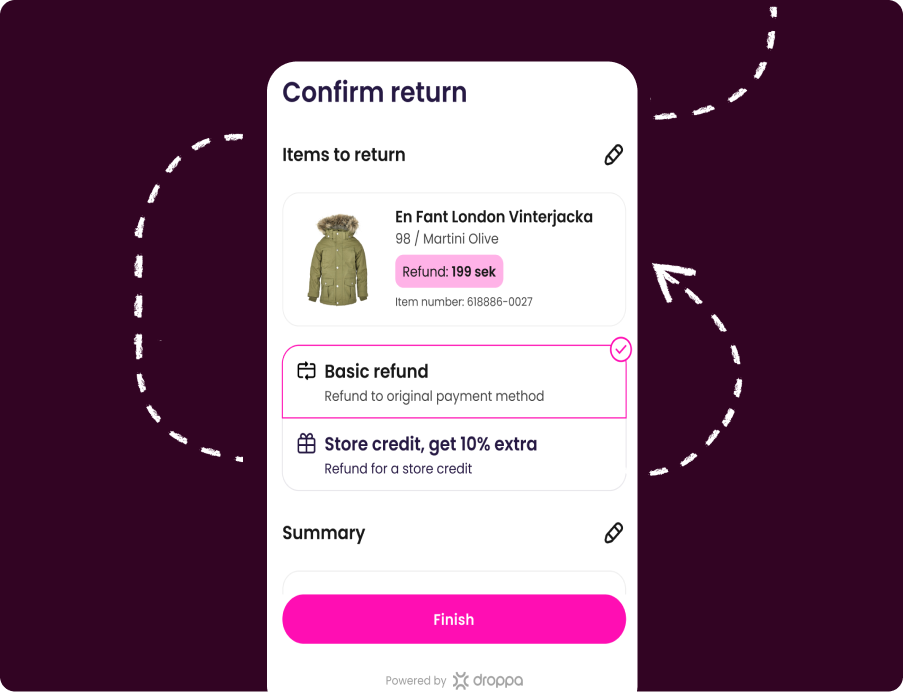
Store credit
Customers can swap a refund for store credit and keep their money ready for the next purchase. Add a little bonus (like 10% extra credit) to make it even more tempting. You choose the credit amount and bonus, making it easy to reward customers while keeping revenue in your store.
REgister claim
Customers can report defective or damaged products directly through the return portal, streamlining the claims process for both you and your customer service team.
How it works:
When selecting an order, customers see the option "Is your product defective?" If they choose this, they're guided through a simple form where they:
- Describe the issue with the product
- Upload an image of the defect
- Provide details about what's wrong
What qualifies as defective:
Products that don't match the description, arrive broken, or aren't functioning properly can be reported as defective.
Automated processing:
Once submitted, the completed form — including photos, description, return label, and order information — is sent directly to your customer service team for review. This ensures all relevant information is captured upfront, reducing back-and-forth communication.
Getting the shipping label
We have multiple options depending on the shipping provider. Here we have gathered what the different options are and how they are displayed to your customers.

Smart shipping selector:
Our intelligent shipping selector can be customized with rule-based logic to prioritize options based on:
- Carrier name and logo
- Whether packaging and labels are required
- When the refund will be initiated
- Nearby drop-off locations
- Any customs instructions, documents, and declarations required for the shipment
What customers see:
- Cost efficiency
- Product type or size
- Speed of return processing
- Most sustainable shipping options
Flexible pricing:
You have full control over return shipping costs. Choose to offer free returns, charge customers, or use a hybrid approach based on return reason or product value — helping you recapture costs while maintaining a positive customer experience.
The shipping options:
Once the return type is selected, customers choose how they want to ship their return. We integrate seamlessly with multiple shipping providers, displaying the available options with clear information about each of them:
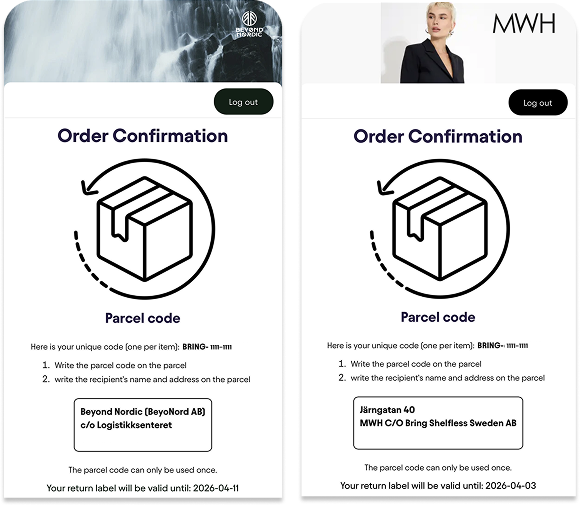
Parcel Code:
When using Bring DK Bulk, Bring DK, or Bring NO Bulk, customers receive a parcel code used to identify the shipment at drop-off points.
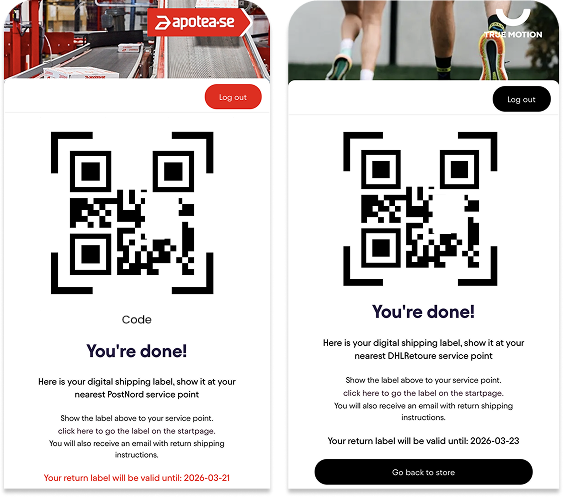
QR Code:
When using PostNord or DHL Retoure, customers receive a QR code that’s scanned at service points or machines to print the shipping label.
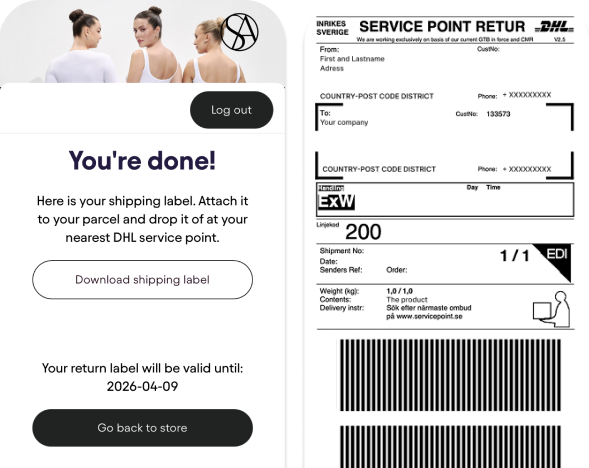
Shipping label:
When the carriers Postnord and DHLRetoure are choosen the shipping option displayed to your customers well be thorugh a QR code. This is a code on your phone that is scanned at the service point or machine so the shipping label can be printed there.
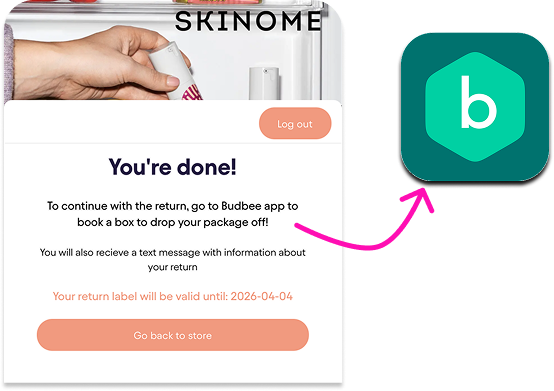
Box Drop Off:
When using Budbee, customers drop the package in a parcel locker for later pickup by the carrier.
Tracking
Keep customers informed every step of the way with automatic status updates throughout the return journey. Our transparent tracking system significantly reduces customer inquiries — decreasing support cases by more than 60%.

Automatic communication:
Customers receive proactive updates via email at key milestones.
Branded Tracking Page:
Customers can track their return in real-time through a fully branded tracking page, giving them complete visibility without needing to contact your support team.
Why it matters:
By keeping customers informed proactively, you eliminate the "Where's my refund?" questions that typically flood customer service. The result is fewer support tickets, happier customers, and a more efficient operation.
Read next page - Admin